GitDisk
Cloud storage with developer superpowers
GitDisk brings version control to cloud storage. Track every file change, collaborate with your team, and never lose important work again with Git-powered file management.
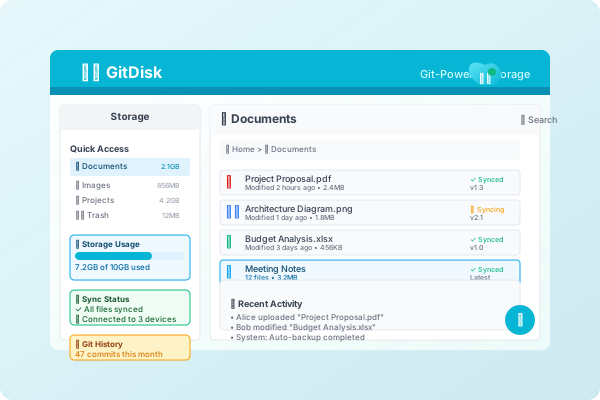
Key Features
Cloud storage that understands your development workflow. Every file change is tracked, versioned, and can be rolled back just like code.
Version-Controlled Storage
Every file change is tracked with full Git version control capabilities.
Large File Support
Handle large files efficiently with Git LFS integration.
Team Collaboration
Share and collaborate on files with your team seamlessly.
Smart Synchronization
Intelligent sync that understands your workflow and priorities.
Developer Integration
Seamlessly integrate with your development tools and workflow.
Enterprise Features
Advanced features for enterprise teams and organizations.
Perfect for
See how GitDisk fits into different workflows and use cases
Design Asset Management
Version control for design files, assets, and creative projects.
Development Workflows
Store and version development assets, documentation, and resources.
Content Management
Manage content files with full version control and collaboration.
Why choose GitDisk?
- Version-controlled file storage
- Large file support with Git LFS
- Team synchronization and sharing
- Conflict resolution for concurrent edits
- Branch-based file workflows
- Integration with development tools
“GitDisk changed how we handle design assets. Having version control for our creative files is incredible.”
“Finally, cloud storage that understands developers. The Git integration makes file management so much better.”
Frequently Asked Questions
Get answers to common questions about GitDisk
How does GitDisk handle large files differently?
GitDisk uses Git LFS (Large File Storage) to efficiently handle large files. This means large files are stored separately and downloaded on-demand, keeping your repository fast.
Can I use GitDisk with existing Git repositories?
Yes! GitDisk can integrate with existing Git repositories and add file storage capabilities without disrupting your current workflow.
What happens if two people edit the same file?
GitDisk provides intelligent conflict resolution. For text files, it uses Git merge capabilities. For binary files, it offers file locking and manual resolution workflows.
Is there a limit on file size?
Individual files can be up to 100GB in size. GitDisk automatically handles large files using Git LFS for optimal performance.
Ready to get started with GitDisk?
Join thousands of developers who trust GitDisk for their workflow