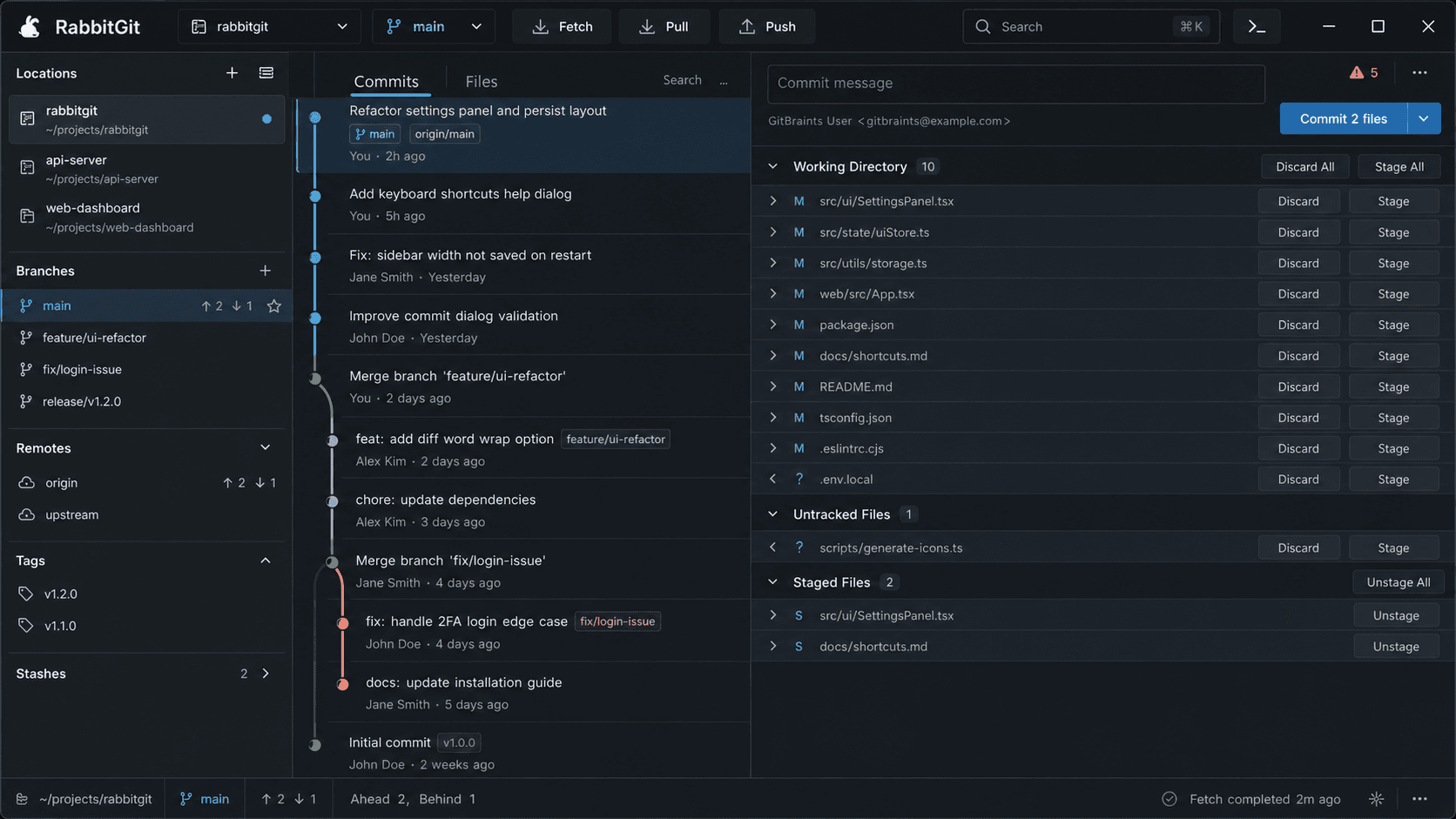
Commit graph and staging
Browse branch history, stage changes, and commit from one workspace.
A modern Git client for Windows, macOS, and Linux — with GitLocker transparent encryption, AI commits and reviews, and agents that run the work for you.
Windows 1.0.0 for Windows 10 or later. Also available for macOS and Linux.
Why RabbitGit
RabbitGit is fast by design, secure with GitLocker encryption, and AI-assisted for everyday Git work.
Built on libgit2 for a native, responsive experience. Stage, commit, branch, and browse large histories without waiting.
GitLocker transparent encryption keeps repository contents encrypted at rest, with keys that never leave your machine.
GitLocker encryption
RabbitGit encrypts repository contents at rest with GitLocker — completely transparent in your daily workflow. Pick the engine that fits your setup.
a1b2c3d· fix: conflict UI stateDoes this also cover the repo-switch cache case?
Yes — validated by the conflict gate scenario.
LGTM, merging into main.
In-repo collaboration
No more lost context between your Git client and your messenger. RabbitGit threads conversations directly on commits and branches, so every decision stays attached to the code it belongs to.
AI assistance
RabbitGit puts an assistant next to your diff — generating commit messages, reviewing code, and explaining anything you point it at.
RabbitGit reads your staged diff and writes a clear, conventional commit message you can accept or edit in one click.
Get an AI review of a diff, commit, or branch — flagging risky changes, edge cases, and regressions before you push.
Refactor auth module
agent/refactor-authAdd unit tests for parser
agent/parser-testsBump dependencies
agent/deps-bumpAgent management
Hand a task to an agent and RabbitGit manages the processes, working directory, branches, and permissions it needs — while you watch task status and review every change before it lands.
Processes
Start, watch, and stop build, test, and dev processes.
Works with your remote
GitHub
HTTPS and SSH
GitLab
Cloud or self-managed
Bitbucket
GUI workflow
Browse history, review diffs, and enable GitLocker encryption from the same desktop window.
Browse branch history, stage changes, and commit from one workspace.
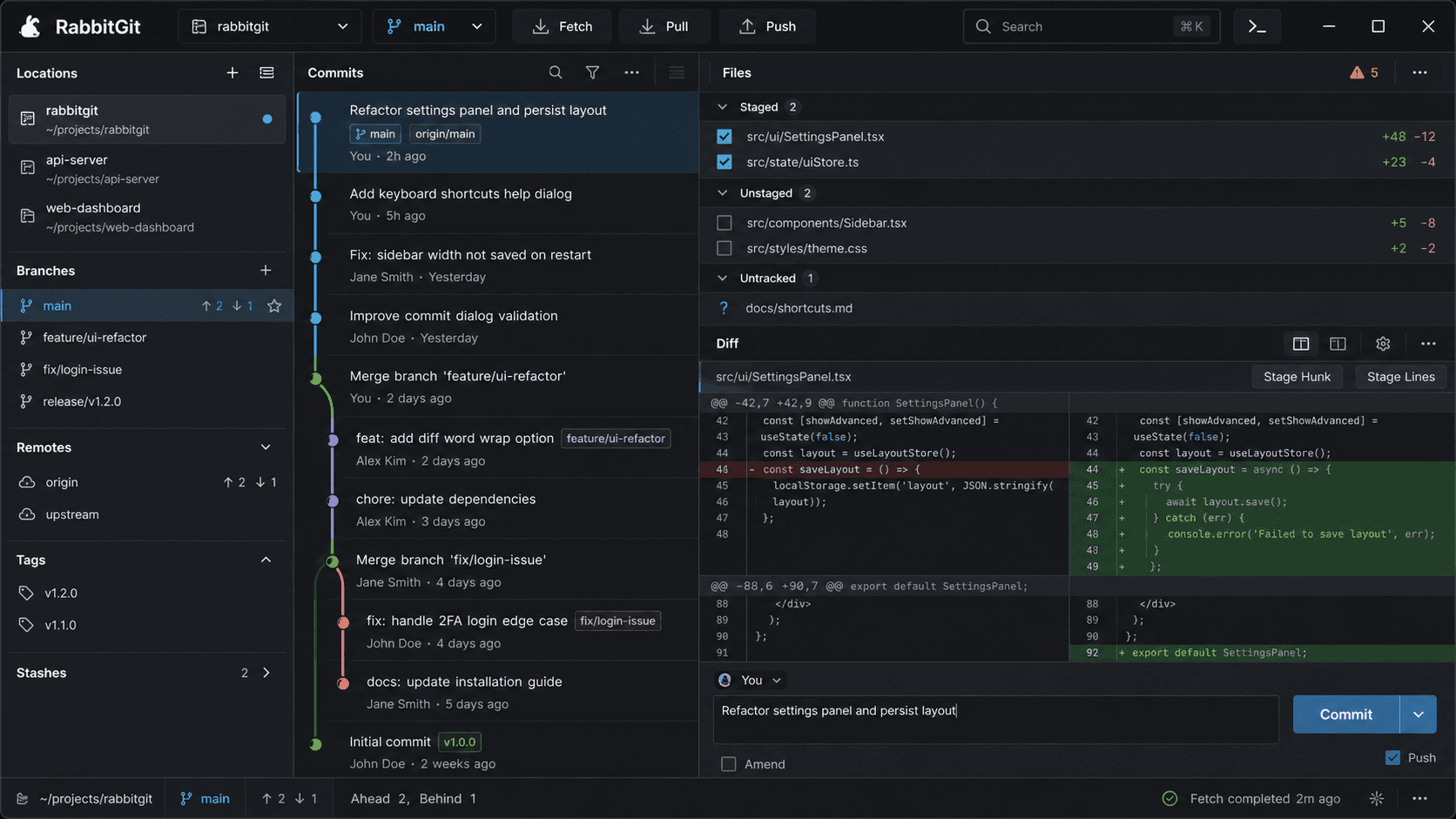
Review changes hunk by hunk before they become history.
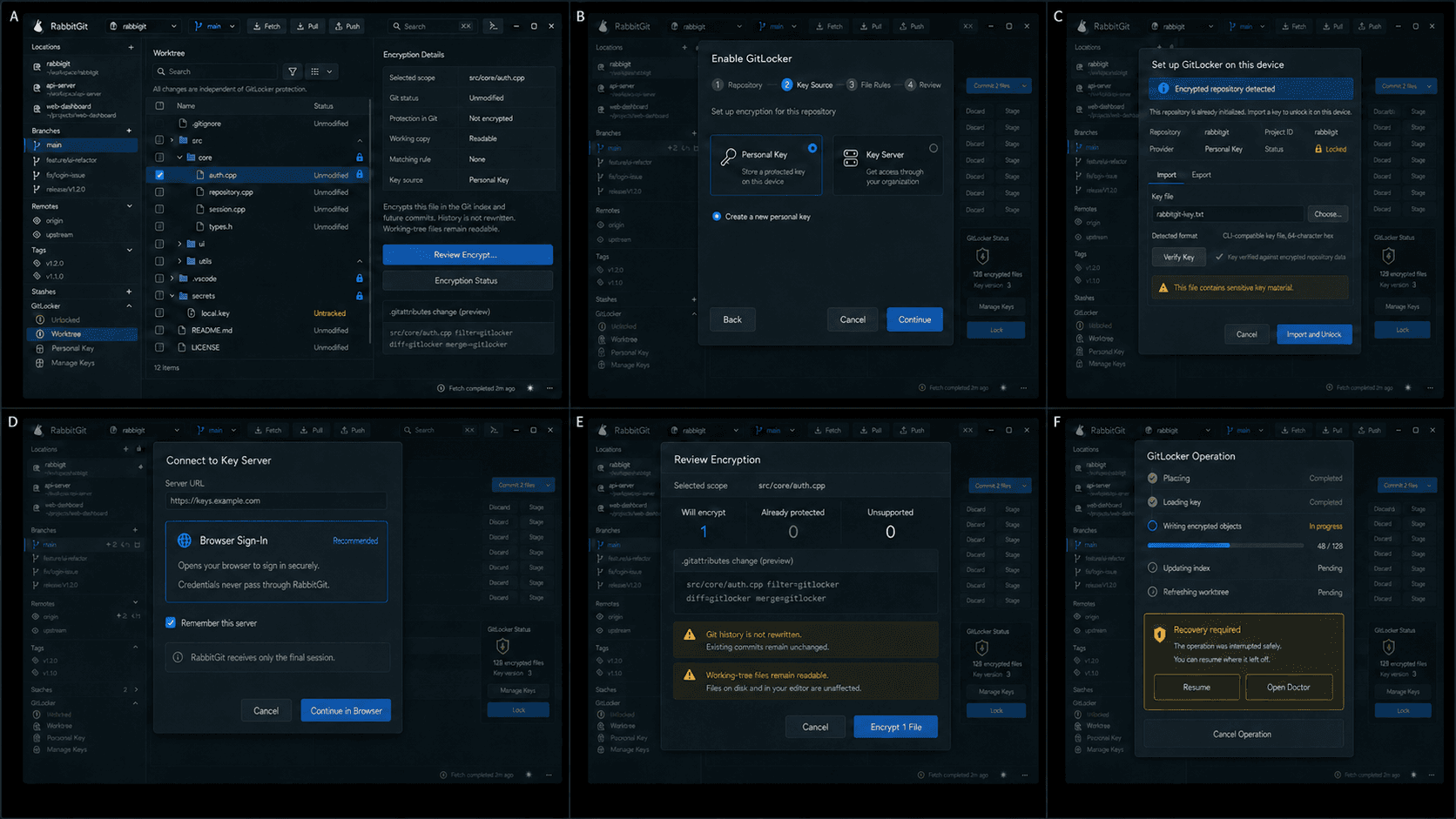
Enable transparent encryption, manage keys, and review encrypted files in place.
FAQ
Short answers for platforms, GitLocker encryption, offline use, in-repo chat, and Git hosting compatibility.
No. RabbitGit is a desktop Git client. Your code, history, and encryption keys stay on your machine — you choose which Git remote to sync with.
RabbitGit integrates GitLocker transparent encryption in two modes: a built-in engine based on libgit2, or an external gitl binary. Repository contents are encrypted at rest while remaining transparent in daily use.
Yes. All core Git operations, GitLocker encryption, and in-repo comments work fully offline.
RabbitGit uses AI to generate commit messages from your staged diff, review changes for risks and regressions, and explain what any commit, function, or hunk does — all next to the code.
You hand an agent a task and RabbitGit manages the processes, working directory, branches, and permissions it needs. You track task status in real time and review every change before it is committed.
Start with the desktop build for your platform. Every build shares the same local-first workflow, with GitLocker transparent encryption and in-repo chat.
Generate commit messages, review changes, and explain any code — an assistant that works right next to your diff.
Ask what a commit, function, or hunk does and get a plain-language explanation, right next to the code.
fix(auth): verify session token before returning
Redirect unauthenticated requests to login and validate the token instead of trusting it directly.
Working directory
Scope every task to a directory it is allowed to touch.
Branches
Create, switch, and clean up branches per task.
Permissions
Grant or deny actions before the agent runs them.
Task status
Track queued, running, and finished work in real time.
Change results
Inspect every file the agent modified before you commit.
Cloud and Server

Azure DevOps
Repos and pipelines
Self-hosted Git
Any bare Git server
Local repository
No remote required
RabbitGit lets your team discuss commits and code inside the repository itself, so decisions stay attached to the history they belong to.
Native builds for Windows (also distributed through the Microsoft Store), macOS (Apple Silicon, Intel, and universal), and Linux.
RabbitGit works with GitHub, GitLab, Bitbucket, Azure DevOps, and any Git remote reachable over HTTPS or SSH.